
A world of possibilities
With each new post comes an opportunity to learn something new. Let your inquisitive nature thrive!
Explore the limitless potential of the Microsoft Power Platform, from mastering DAX in Power BI to automating tasks with Power Automate and building low-code apps in Power Apps. Dive into the content, join the conversation, and subscribe to stay inspired!

Design Meets Data: From Static Slicers to Interactive Decision Aids
What if your slicers could answer questions before you even select them? With a little preview context, they can guide users toward the right decisions…


Automate Power BI Refresh with Power Automate and SharePoint
Learn how to trigger Power BI dataset refreshes automatically using Power Automate when new files are added to SharePoint. We have created a Power BI…

Power BI Object-Level Security Explained: Control Table and Column Access by Role
Learn how to hide entire tables and columns in Power BI—so sensitive data stays protected and users see only what they need. This is the…

Power BI Partial RLS Explained: Let Users See the Bigger Picture
Explore how to deliver personalized insights without losing the bigger picture. This post is part two of a series on Power BI security patterns. Check…

Power BI Row-Level Security Explained: Protect Data by User Role
Discover how to personalize your reports and show each user only the data they require in just a few clicks. When creating reports for teams…

Power Automate vs. Locked Files: A Smarter Way to Update Locked SharePoint Files
How to Update Locked SharePoint Files Without Loops or User Headaches The Hidden Workflow Killer: Locked Files in SharePoint Imagine you have created a Power…

Explore Power BI Core Visualizations: Part 4 – Table and Matrix Visuals
Chart your data journey! Transform data into insights with Power BI core visualizations. Table and Matrix visuals in Power BI are essential for presenting detailed…

Power BI Feature Spotlight: Multi-Select Text Slicer, Better Treemaps, and TMDL View
Stay ahead of the latest features with a focused look at Power BI’s latest features, their benefits, and use cases. Dive into walkthroughs and tips…
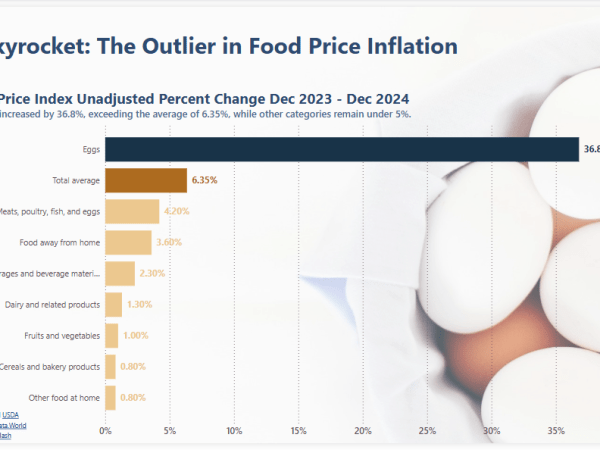
Enhancing Bar Charts in Power BI: A 2025 Workout Wednesday Challenge
Make your Power BI reports more impactful—learn how to highlight key data points in a bar chart! Workout Wednesday is a weekly challenge series designed…

Dive into DAX: Unlock the Full Potential of FORMAT
Learn how to create interactive, audience-friendly visuals with custom formatting and dynamic insights I recently participated in a data challenge and used it to explore…

Dive into DAX: Getting Started with DAX Query View
A Beginner’s Guide to Exploring Data Models with DAX Queries Getting Started with DAX Query View DAX Query View in Power BI Desktop lets us…
Power BI Feature Spotlight: Data Filtering and Modeling
Stay ahead of the latest features with a focused look at Power BI’s latest features, their benefits, and use cases. Dive into walkthroughs and tips…
Power BI Feature Spotlight: Marker Enhancements
Stay ahead of the latest features with a focused look at Power BI’s latest features, their benefits, and use cases. Dive into walkthroughs and tips…

Elevate Power Automate Error Handling with Centralized Failure Notifications
Learn how to create a dynamic failure notification framework across Teams channels with a centralized SharePoint setup Handling errors in Power Automate workflows can be…
Design Meets Data: A Guide to Building Engaging Power BI Report Navigation
Streamlined report navigation with built-in tools to achieve functional, maintainable, and engaging navigation in Power BI reports. Before we begin developing the navigational element of…

Explore Power BI Core Visualizations: Part 3 – Pie, Donut, and Treemap
Chart your data journey! Transform data into insights with Power BI core visualizations. Pie, Donut, and Treemap charts can be helpful tools when we need…

Power Query Functions: Building Flexible and Reusable Data Cleaning Routines
Enhancing Consistency and Efficiency with Customizable Power Query Workflows When extracting and transforming data in Power BI, we often repeat the same steps across different…

Explore Power BI Core Visualizations: Part 2 – Line and Area Charts
Chart your data journey! Transform data into insights with Power BI core visualizations. Welcome back to our exploration of the core visuals in Power BI.…

Explore Power BI Core Visualizations: Part 1 – Bar and Column Charts
Chart your data journey! Transform data into insights with Power BI core visualizations. Overview of the blog series This series is designed to explore and…
Dive into DAX: Simplify Data Models with Relationship Functions
Learn the art of data modeling and how to enhance your analysis with DAX Relationship Functions. The Basics of DAX Relationship Functions DAX Relationship Functions…
Something went wrong. Please refresh the page and/or try again.

 Ethan Guyant